How to Test If Your Phone Speaker Is Working
A two-minute check that tells you whether your speaker is fine, blocked, or actually broken — and which side to worry about.
The fastest way to check
Play a song you know well, at a normal volume, in a quiet room. If it sounds full and even, your speaker is working. If it sounds thin, distant, or like it is coming from behind glass, something is off. Music is a decent first check, but it will not tell you which speaker is the problem or how bad it is. For that, you need a proper test tone rather than a song.
The quickest way is a dedicated speaker test that plays a clean tone through one side at a time. Open the tool, switch to test mode, and pick left, right, or both.
Testing left and right separately
Most phones and laptops have more than one speaker, and a fault often hides in just one of them. Playing both sides at once can mask a weak one, because your brain fills in the gap. Switching sides one at a time removes that guesswork.
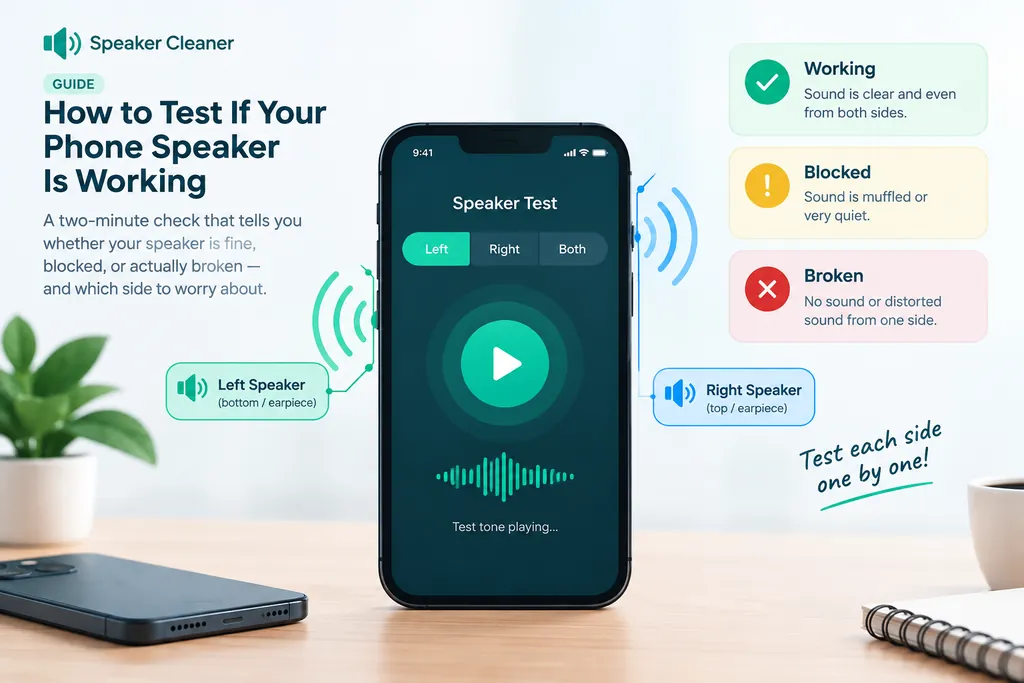
Run through all three settings and rate what you hear:
- Left and right sound the same — both speakers are pulling their weight. Any dullness you're hearing is likely affecting the whole device evenly, which usually points to dust or a case blocking the grille.
- One side is clearly quieter — that speaker may have debris in it, or the driver itself could be damaged. Worth cleaning first, since a blockage is far more common than a broken part.
- One side is silent — either that channel has failed completely or the connection to it has come loose. Cleaning is worth a try, but be ready for the answer to be a repair.
Rule out the phone before you blame the speaker
A few settings can mimic a broken speaker perfectly. Check these before you go any further:
- Media volume is turned down even though the ringer is fine — the two are separate on most phones.
- A Bluetooth speaker, earbuds, or a car system is still connected in the background, quietly stealing the audio.
- A sound enhancer or equalizer app is applying a strange preset.
- A case, screen protector, or pocket lint is physically sitting over the grille.
Restarting the phone clears a surprising number of these on its own.
Loudspeaker, earpiece, and speakerphone are three different things
People often test music, notice it sounds fine, then get confused when calls still sound bad. That's because calls usually route through the small earpiece speaker near the top of the screen, not the main loudspeaker at the bottom. Test each one on its own:
- Loudspeaker — play music or a video with the phone flat on a table.
- Earpiece — make a call and hold the phone to your ear as usual.
- Speakerphone — make a call and switch to speaker mode, which usually plays through the same loudspeaker as music.
If one of the three is bad and the other two are fine, you've found exactly which part needs attention.
If the test points to a blockage
A speaker that plays but sounds muffled, on one side or both, is usually blocked rather than broken. Water, pocket lint, and dust are the three common causes. Run the cleaning tool, then repeat the left/right test to see if the gap between the two sides has closed. If your phone was recently wet, start with this guide on getting water out of a phone speaker instead of jumping straight to dust mode.
If the test still fails after cleaning
When one side stays silent, or the sound is crackling and distorted rather than just quiet, cleaning is unlikely to be the fix. Our guide on telling a blocked speaker apart from a broken one walks through the signs that point to hardware damage and when it's worth getting a quote instead of trying another round.
Testing other devices
The same left/right check works on tablets, laptops, and Bluetooth speakers. Open the tool on the device itself so the sound doesn't route through another speaker by mistake, turn the volume up, and listen for the same three outcomes: even, uneven, or silent on one side.
FAQs
How do I test if my phone speaker is working?
Play something you know well, like a song or a voice memo, at a normal volume. If it sounds full and clear, the speaker is fine. If it sounds thin, quiet, or muffled, run a left/right speaker test to see whether one side or both sides are affected.
Why does only one side of my phone play sound?
Most phones have two openings that people call speakers, but usually only one is the main loudspeaker; the other may be a second driver or a microphone port. A real difference between left and right during a stereo test usually points to a blocked or damaged driver on the quieter side.
Can a software update break my speaker?
The speaker itself, no. But a stuck equalizer, a Bluetooth device still connected in the background, or a media volume set separately from the ringer can all make sound seem broken when the hardware is fine. Rule these out before assuming a repair is needed.
Is there a free app to test speakers?
You do not need to install anything. Any page that plays a tone through your speakers works as a speaker test, including the free tool linked in this guide.
My speaker sounds fine on calls but bad on music. Why?
Calls often route through the earpiece, not the main loudspeaker, so the two can fail independently. Test them separately: play music for the loudspeaker, then make a call on speakerphone for the other one.
How do I test speakers on a laptop or tablet?
The same idea works. Open the tool on the device itself, turn the volume up, and run the left/right test. Laptops with stereo speakers usually place one on each side of the keyboard, so the difference is easy to hear.